Private AI food diary for quick nutritional awareness
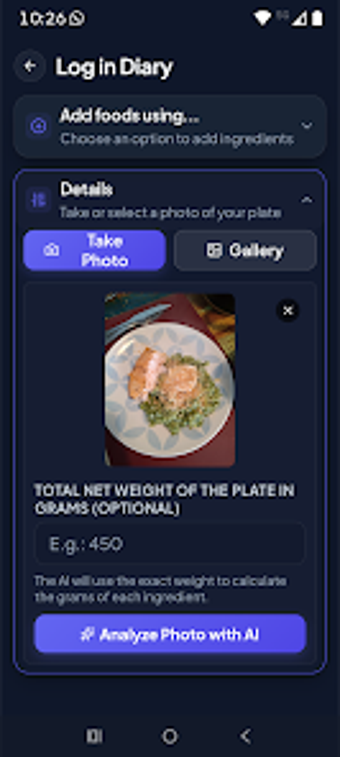
Nutio, developed by Nutio, is an Android food diary built to record meals and illuminate daily eating patterns. The app uses AI-assisted photo or text logging to produce immediate nutrient estimates and presents macronutrient and micronutrient breakdowns, plus hydration and weight-trend charts for simple tracking. It targets health-conscious people who want a privacy-minded, low-friction tool for mindful eating without the bureaucracy of strict calorie-counting workflows.
How accurate are its nutrient estimates for regional diets?
Accuracy leans on integration with the Official Brazilian Food Composition Table (TACO), which grounds nutrient values in a nationally maintained database. That connection helps the app match local ingredients and recipes more closely than generic tables. The app reports macronutrients and specific micronutrients, including calcium and iron, so users seeking measurable vitamin and mineral detail can review specific entries and daily totals in the dashboard.
What devices and export options does the app offer?
The app is available on Android and provides built-in export and developer options aimed at practical use. Key supported flows include:
- Excel export for sharing complete nutritional reports
- an option to supply a personal API key for custom AI processing
Is Nutio convenient for everyday routines and onboarding?
Onboarding and daily entry emphasize minimal friction: the program is described as lightweight and focused, and it requires no registration to start tracking. The absence of intrusive interruptions keeps attention on quick entries and chart review, which helps people maintain simple daily habits rather than wrestling with lengthy setup or promotional overlays.
How does Nutio handle privacy and offline use?
Privacy is central: the design follows an offline-first approach and keeps logs on the device rather than in a cloud account. There is no mandatory account creation and the app avoids invasive advertisements, which reduces external data sharing. Those facts give clear control to the person using the phone, particularly for anyone who prefers local-only records over remote syncing.
To sum up, Nutio fits privacy-minded self-trackers who want low-friction nutrient awareness
Nutio is a practical choice for health-conscious individuals who want straightforward meal logging and trend visibility without the paperwork of strict calorie-counting systems. It is less suited to people who need formal, clinical calorie totals or team-based record sharing. To sum up, the app fits daily personal monitoring on Android for users who prioritise simplicity and local control.